AI File Management
elDoc provides comprehensive enterprise file management capabilities enhanced with GenAI, AI Agents, semantic search, and Agentic RAG.
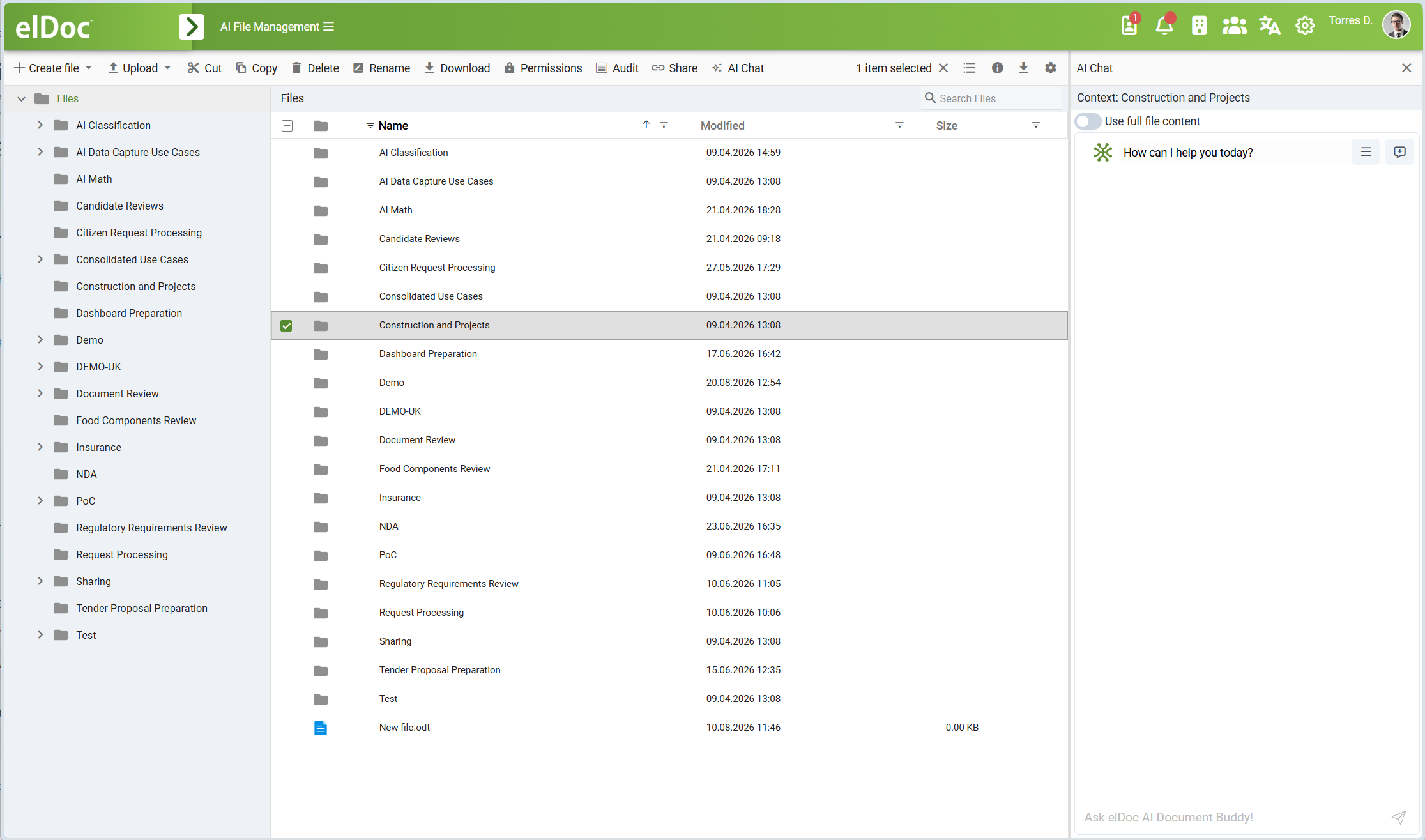
The File Management module enables organizations to securely store, organize, access, search, collaborate on, and manage files throughout their lifecycle. Documents stored in elDoc can also become part of an intelligent enterprise knowledge base, allowing users to interact with organizational information using natural language through GenAI Chat.
Depending on the enabled elDoc configuration, stored documents can be automatically processed, indexed, analyzed, classified, and made available for AI-assisted search, Agentic Retrieval-Augmented Generation (Agentic RAG), and other intelligent document operations.
The File Management module includes the following key capabilities:
- File Management: Create, upload, download, rename, move, copy, sort, and delete files. Multiple files can be uploaded using bulk upload or drag-and-drop.
- Hierarchical Folder Structure: Create folders and subfolders to organize files according to organizational structure, projects, business areas, document categories, or other requirements.
- GenAI Chat: Interact with documents and repositories using natural language. Users can ask questions about stored information, request summaries, analyze documents, compare information from multiple sources, and retrieve relevant knowledge without manually reviewing each document.
Agentic RAG: Use AI Agents together with Retrieval-Augmented Generation (RAG) to dynamically retrieve relevant information from documents and use it as context for Large Language Models. This enables context-aware responses grounded in information available within the organization's document repository.
Semantic Search: Find documents and relevant information based on meaning and context rather than relying exclusively on exact keywords. Vector-based semantic retrieval complements traditional search capabilities and allows conceptually related information to be discovered even when different terminology is used.
Full-Text Search: Search indexed document content using traditional keyword and full-text search capabilities.
AI-Powered Document Analysis: Use GenAI models to understand and analyze document content, summarize information, extract relevant facts, and support other document-oriented AI operations.
AI Agents for File Management: Use AI Agents to perform intelligent document-management operations, including document classification, intelligent file renaming, metadata assignment, and automated organization of files into appropriate folders based on document content and user instructions.
OCR and Content Extraction: Process scanned documents and images using Optical Character Recognition (OCR) to extract machine-readable text. Extracted content can subsequently be indexed and used for search, semantic retrieval, GenAI Chat, RAG, and other AI-powered processing.
Online Preview: Preview supported documents and images directly in the browser without downloading the original file.
Online Editing: Edit supported office document formats directly in the browser.
Real-Time Collaboration: Allow multiple users to work on the same supported document simultaneously using online collaborative editing.
File Version Control: Maintain and manage multiple versions of files and preserve their revision history.
Support for Different File Formats: Store and manage a wide range of file types, including text documents, spreadsheets, presentations, drawings, PDF files, images, and other enterprise content.
Access Control and Permissions: Grant or revoke permissions for operations such as access, viewing, editing, copying, renaming, deleting, printing, and downloading. Access permissions can be assigned directly or inherited through the folder hierarchy.
Auditing and Traceability: Maintain audit information for document- and file-related activities to support accountability, security, and compliance requirements.
Secure File Sharing: Share files while maintaining applicable access-control and security requirements.
GenAI and Intelligent Knowledge Access
Files stored in elDoc can be used as an enterprise knowledge source for AI-assisted interaction.
When GenAI functionality is enabled, elDoc can process document content and create the indexes required for intelligent retrieval. Depending on the configured deployment, this can include full-text indexing, vector embeddings, semantic retrieval, and reranking of retrieved information.
This enables users to access organizational knowledge using GenAI Chat rather than relying exclusively on conventional navigation or keyword search.
For example, a user can ask questions such as:
- What are the main obligations defined in this contract?
- Summarize this document.
- Find documents related to a particular project, customer, subject, or event.
- Compare information contained in several documents.
- Find documents that discuss a concept even if they do not contain exactly the same keywords.
- Extract specific facts or information from stored documents.
- Identify relevant documents and explain why they are relevant.
GenAI Chat can use information retrieved from one or multiple documents as context for generating a response.
Agentic RAG
elDoc supports Agentic Retrieval-Augmented Generation (Agentic RAG) for intelligent access to document repositories.
Traditional RAG retrieves relevant information and provides it to a Large Language Model as additional context. Agentic RAG extends this approach by allowing AI Agents to determine how information should be retrieved and processed to answer a request.
Depending on the request, an AI Agent can perform multiple retrieval and reasoning steps, use different information sources, refine searches, and combine relevant information before producing the final response.
This approach is particularly useful for large enterprise repositories where answering a question may require information distributed across multiple documents.
Agentic RAG helps provide AI-generated responses that are grounded in information available within the elDoc repository rather than relying exclusively on the general knowledge of the underlying Large Language Model.
AI Agents for File Organization
AI Agents can also assist with management and organization of files stored in elDoc.
Depending on the available AI functionality and permissions, AI-assisted operations can include:
- document classification;
- intelligent file renaming;
- generation or assignment of metadata;
- identification of document categories;
- automated organization of files into folders;
- processing of groups of documents based on natural-language instructions.
For example, a user can request that documents be classified by type, year, organization, project, or another characteristic identified from their content.
AI-assisted operations remain subject to the access rights and permissions configured in elDoc.
Search and Retrieval
elDoc can combine several complementary methods for locating information.
Metadata and Folder Navigation
Users can navigate through the hierarchical folder structure and locate files according to their organizational placement and metadata.
Full-Text Search
Full-text search enables users to locate documents containing specified words, phrases, or other indexed textual information.
Semantic Search
Semantic search uses vector representations of document content to retrieve information based on meaning and contextual similarity.
For example, a document discussing employee remuneration may still be relevant to a search concerning staff compensation, even when the exact terminology differs.
Hybrid Retrieval
For AI-assisted retrieval and RAG scenarios, elDoc can combine traditional search with vector-based semantic retrieval and subsequent reranking of candidate results.
This allows the system to take advantage of both exact textual matches and semantic relevance when identifying information to be supplied to GenAI models.
OCR and Scanned Documents
Documents do not need to originate as digitally generated files in order to participate in search and AI-assisted processing.
Scanned documents and images can be processed using OCR to create machine-readable textual content.
Once document content has been extracted, it can be used for:
- full-text indexing;
- semantic indexing;
- vector embeddings;
- GenAI Chat;
- Agentic RAG;
- AI-powered document analysis;
- document classification;
- intelligent document processing.
This makes historical archives, scanned correspondence, drawings containing recognizable textual information, and other image-based documents accessible to elDoc search and AI functionality when supported by the configured processing pipeline.
Access Control and Security
Access to files and folders is controlled by the elDoc security and permissions model.
Permissions can be assigned to users, groups, roles, and organizational structures as applicable to the configured environment.
File-level and folder-level permissions can control operations such as:
- access;
- view;
- edit;
- copy;
- rename;
- delete;
- print;
- download.
Permissions can be inherited through the folder hierarchy or defined specifically for an individual file where required.
The same access-control principles apply when documents are accessed through search and AI-assisted functionality. GenAI Chat, RAG, AI Agents, and other intelligent capabilities operate within the permissions available to the corresponding user.
This ensures that AI-assisted access does not provide a mechanism for bypassing the document security model.
File Version Control
elDoc supports file version management to preserve changes made to documents over time.
Version control allows document revisions to be maintained while keeping the file logically associated with the same managed document.
This capability is especially important when documents are edited collaboratively or updated during their lifecycle.
Online Preview, Editing, and Collaboration
elDoc supports online preview for a wide range of document and image formats.
Some supported document formats can additionally be edited directly in the browser. Online document editing can support simultaneous collaborative work by multiple users.
Availability of preview and editing functionality depends on the file format and configured online document-editing capabilities.
Supported File Formats for Online Preview
The following file formats are supported for online preview.
Some of these formats also support online editing and real-time collaboration. For example, common office formats such as .docx, .odt, .xlsx, .ods, .pptx, and .odp can be edited online when the corresponding online document-editing functionality is enabled.
Text Documents
.sxw, .odt, .fodt, .stw, .ott, .doc, .dot, .docx, .docm, .dotx, .dotm, .wpd, .pdb, .hwp, .wps, .wri, .lrf, .mw, .rtf, .txt, .fb2, .cwk, .pages, .abw, .602, .sxg, .odm, .otm, .oth
Spreadsheets
.sxc, .ods, .fods, .stc, .ots, .xls, .xla, .xltx, .xltm, .xlsx, .xlsb, .xlsm, .dif, .slk, .csv, .tsv, .dbf, .wk1, .wks, .xlr, .123, .qpw, .wb1, .wq1, .wq2, .gnumeric, .numbers
Presentations
.sxi, .odp, .fodp, .sti, .otp, .ppt, .pot, .pptx, .pptm, .potx, .potm, .ppsx, .cgm, .key
Drawings
.sxd, .odg, .fodg, .std, .otg, .dxf, .emf, .wmf, .cdr, .vsd, .vsdx, .vss, .pub, .p65, .wpg, .fh, .pdf
Images
.jpeg, .jpg, .jpe, .jif, .jfif, .jfi, .gif, .png, .svg, .bmp, .dib, .ico, .tif, .tiff, .webp
Other file types can also be stored and managed in elDoc. Availability of online preview, online editing, OCR, content extraction, indexing, and AI processing depends on the particular file format and the functionality enabled in the elDoc deployment.
File Management as an Enterprise Knowledge Platform
With GenAI functionality enabled, elDoc File Management goes beyond traditional document storage.
Documents stored in the repository can become searchable and reusable enterprise knowledge that can be accessed through conventional navigation, full-text search, semantic search, GenAI Chat, and AI Agents.
By combining enterprise file management, granular access control, OCR, search, vector retrieval, Agentic RAG, and Large Language Models, elDoc enables organizations to securely transform large document repositories into an AI-powered enterprise knowledge base.
Last modified: August 25, 2026