AI Models Integration
elDoc provides flexible AI model integration capabilities that allow administrators to connect and configure models for different AI functions across the platform.
AI models can be configured in two ways:
through the elDoc configuration file;
through the Integrations page in the Admin interface.
Both approaches are supported and can be used according to deployment and administration requirements.
The configuration-file approach is primarily intended for system-wide model definitions, while the Integrations page provides a convenient administrative interface for adding and maintaining chat-oriented AI models without modifying application configuration files.
System-Wide Models Configured in the elDoc Configuration File
The elDoc configuration file can define the core AI models used system-wide by the platform.
The following model roles can be configured:
Chat model — used for general GenAI Chat and natural-language interaction;
Agent model — used by AI Agents and supports tool usage;
Vision-Language (VL) model — used for processing image-based and visually rich document content;
Reranking model — used to score and reorder retrieved results according to their relevance;
Embedding model — used to generate vector representations for semantic search, RAG, and related retrieval functions.
These settings are applied at the system level and provide the default AI execution environment for the corresponding elDoc capabilities.
System-wide configuration is suitable when administrators want to establish centrally managed defaults for the entire elDoc deployment.
Models Configured Through the Integrations Page
Additional AI models can also be configured through the Integrations page.
The Integrations page allows administrators to define AI providers and add one or more models under each provider configuration.
This approach provides a graphical administration interface for managing AI model connections and is particularly useful for adding chat models that can be selected and used by elDoc AI functionality.
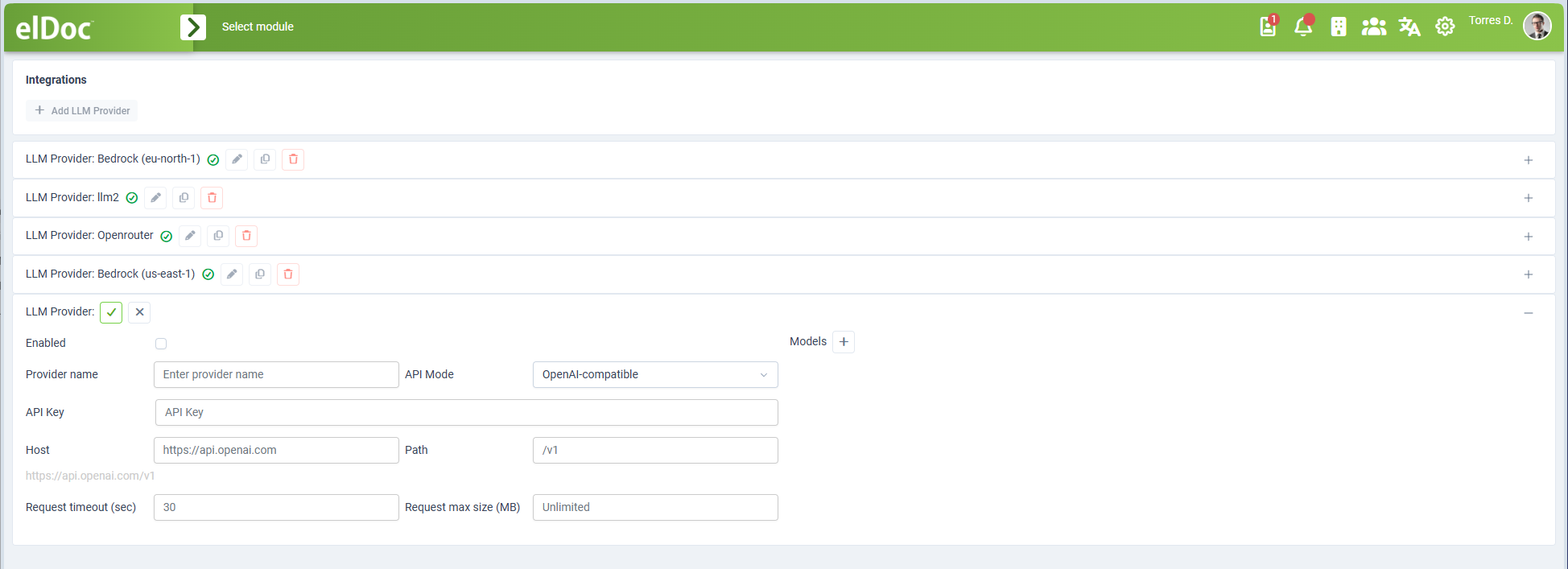
Provider Configuration
When adding or editing an AI provider, administrators can configure connection settings required for communication with the corresponding AI service.
Depending on the selected API mode, available settings can include:
provider name;
API mode:
- OpenAI-compatible
- AWS Bedrock
authentication credentials;
host or service endpoint;
API path;
region or service-specific settings;
request timeout;
maximum request size;
provider-specific connection options:
- Service Tier (for AWS Bedrock):
- Default
- Priority
- Service Tier (for AWS Bedrock):
The provider can be enabled or disabled without removing its configuration.
This makes it possible to maintain multiple AI integrations and activate only those required for the current deployment.
Model Configuration
One or more models can be configured under an AI provider.
Each model can be enabled or disabled independently.
The model configuration includes the model identifier and the capabilities that elDoc can use with that model.
Chat capability is the default use case for models configured through the Integrations page.
Additional capabilities can be enabled where supported by the connected model.
Tool Usage
The Tools use capability indicates that the model can work with elDoc tools.
Tool-capable models can be used for AI operations that require the model to invoke controlled platform functions in addition to generating text responses.
This capability is required for scenarios where an AI model must interact with elDoc functionality through the available tool interface.
Vision-Language Capability
The Vision capability indicates that the model can process visual input.
Vision-capable models can be used with image-based documents and other content that requires multimodal or Vision-Language processing.
This allows the model to work not only with textual prompts but also with visual document content where supported by the corresponding AI workflow.
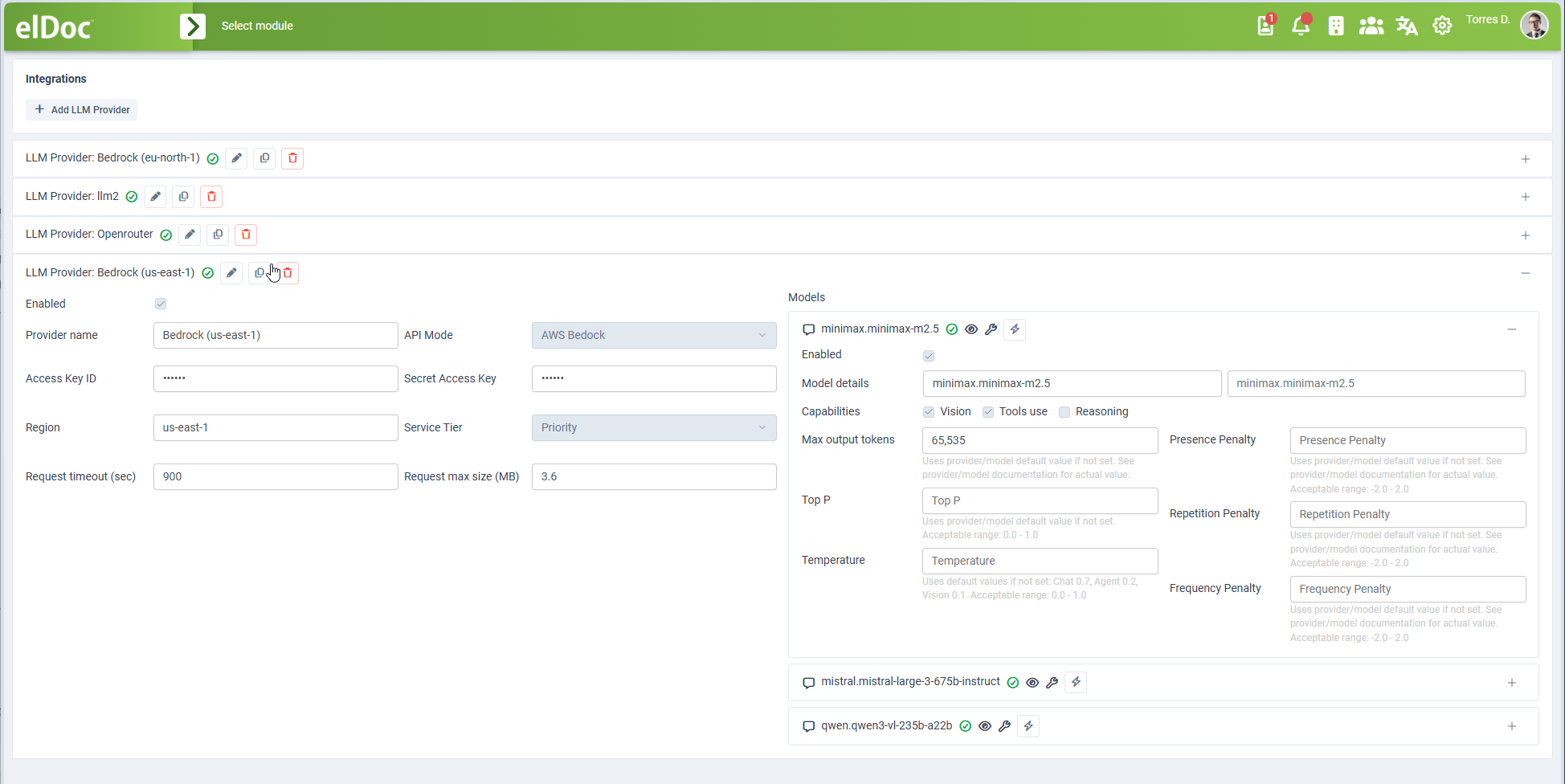
Model Parameters
The Integrations page also allows model-specific inference parameters to be configured.
Depending on the model and provider, configurable parameters can include:
maximum output tokens;
Top P;
Temperature;
Presence Penalty;
Repetition Penalty;
Frequency Penalty.
If a parameter is not explicitly configured, elDoc uses the applicable provider or model default value.
Administrators should configure these parameters only when there is a specific reason to override the model defaults.
Using Configuration File and Integrations Together
The two configuration methods serve complementary purposes.
The elDoc configuration file defines the core system-wide models used for the main AI roles:
Chat
Agent
Vision-Language
Reranking
Embeddings
The Integrations page allows additional chat-oriented models to be connected and managed through the Admin interface, with optional support for:
Tool usage
Vision-Language capabilities
This allows elDoc deployments to maintain stable system-wide defaults while also providing administrators with flexibility to connect and manage additional models through the user interface.
Configuration Scope
Models defined in the elDoc configuration file are system-wide settings.
They provide the default models used by the corresponding platform capabilities unless another supported configuration explicitly selects a different model.
Models configured through the Integrations page are maintained as reusable AI integrations and can be made available to supported elDoc AI functionality according to the platform configuration.
This separation allows administrators to distinguish between:
core models required by the overall elDoc deployment;
additional models integrated through the administrative interface.
Summary
elDoc supports two complementary approaches to AI model integration.
Configuration File
Used to define the primary system-wide models for:
Chat;
AI Agents and tool usage;
Vision-Language processing;
Reranking;
Embeddings.
Integrations Page
Used to connect and manage additional AI providers and chat models through the Admin interface.
Models added through Integrations can additionally declare support for:
Tool usage;
Vision-Language processing.
The Integrations page also provides control over connection settings, model enablement, request limits, and model-specific inference parameters.
Together, these options provide a flexible AI model integration architecture that supports centrally managed system defaults while allowing additional models to be configured and maintained through the elDoc administrative interface.
Last modified: August 26, 2026