Document Indexing configuration
elDoc File Management provides configurable document indexing functionality for defining structured information associated with files.
Indexing allows organizations to create reusable global Indexing Fields, define their data types and multilingual names, group fields into Indexing Profiles, and assign those profiles to folders in File Management.
The same indexing definitions are also used by elDoc AI capabilities for intelligent data extraction and document processing.
The indexing configuration consists of three main elements:
Indexing Fields — reusable global definitions of structured document indexing fields.
Indexing Profiles — named groups of indexing fields.
Folder Assignment — association of an Indexing Profile with a File Management folder.
This approach allows a common document indexing model to be defined once and reused across multiple document repositories and business processes.
Opening Indexing Settings
Indexing configuration is available from Indexing settings in File Management.

The Indexing Settings page contains two main sections:
Indexing fields
Indexing profiles
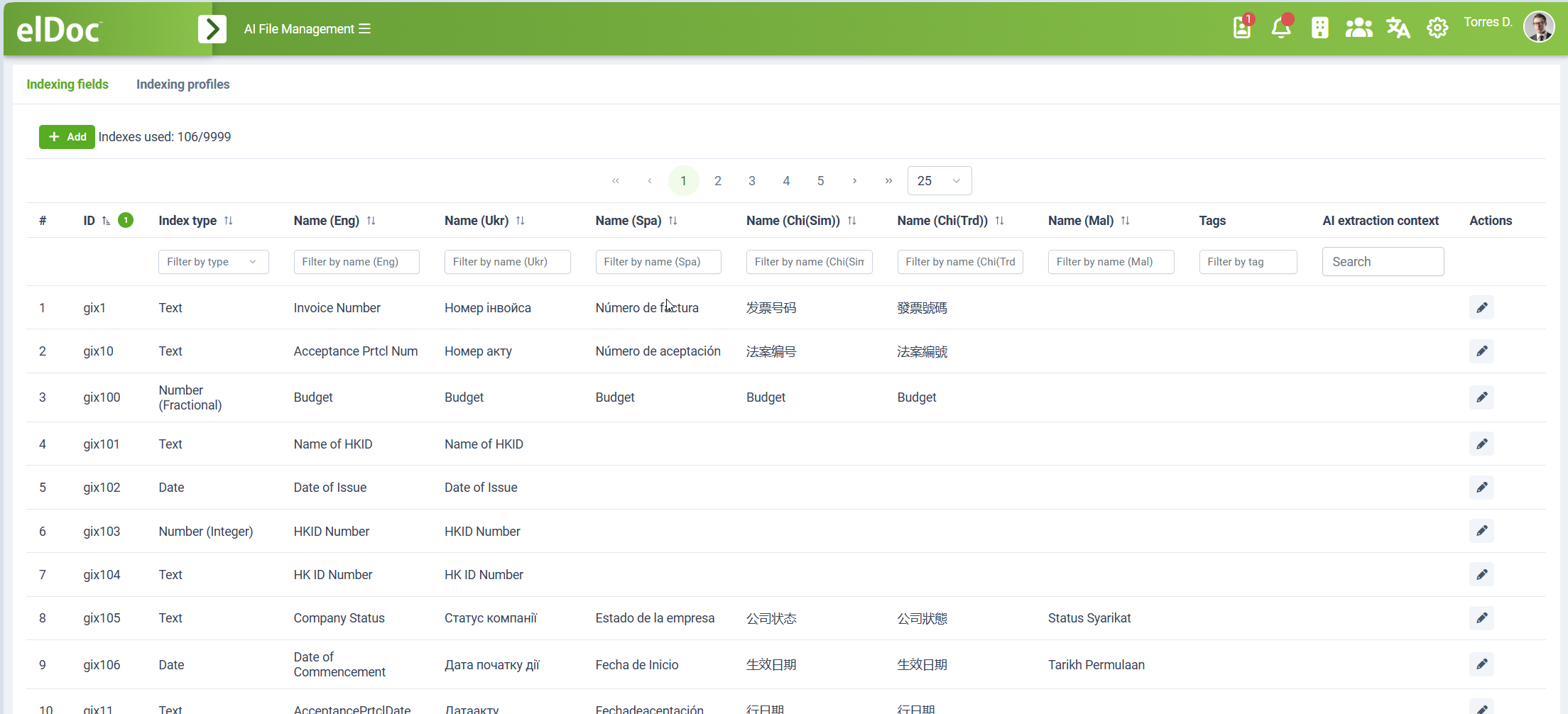
The Indexing fields section is used to create and maintain individual Indexing Fields.
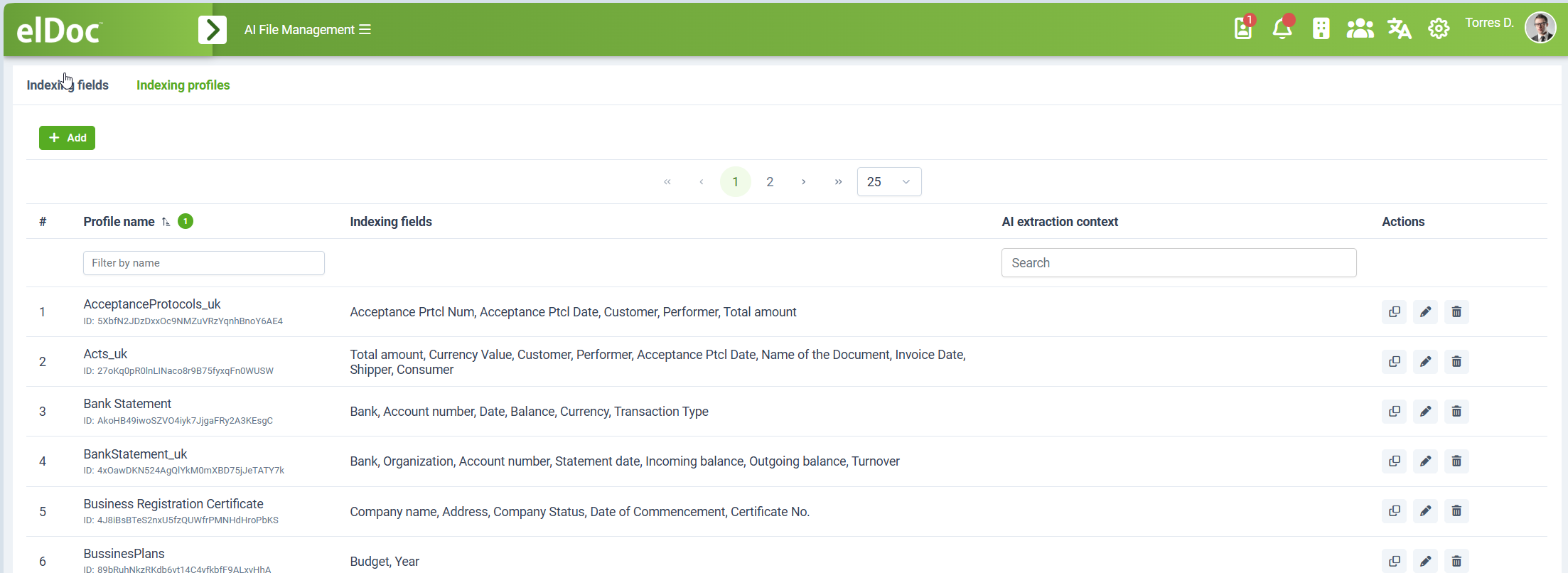
The Indexing profiles section is used to group Indexing Fields into reusable Indexing Profiles.
Indexing Fields
An Indexing Field defines a structured value that can be associated with a document.
Examples include:
Invoice Number
Invoice Date
Customer
Company Name
Account Number
Currency
Total Amount
Project Number
Document Type
Date of Issue
Indexing Fields are defined globally and can subsequently be reused in multiple Indexing Profiles.
This avoids creating separate definitions of the same indexing field for every folder or document type.
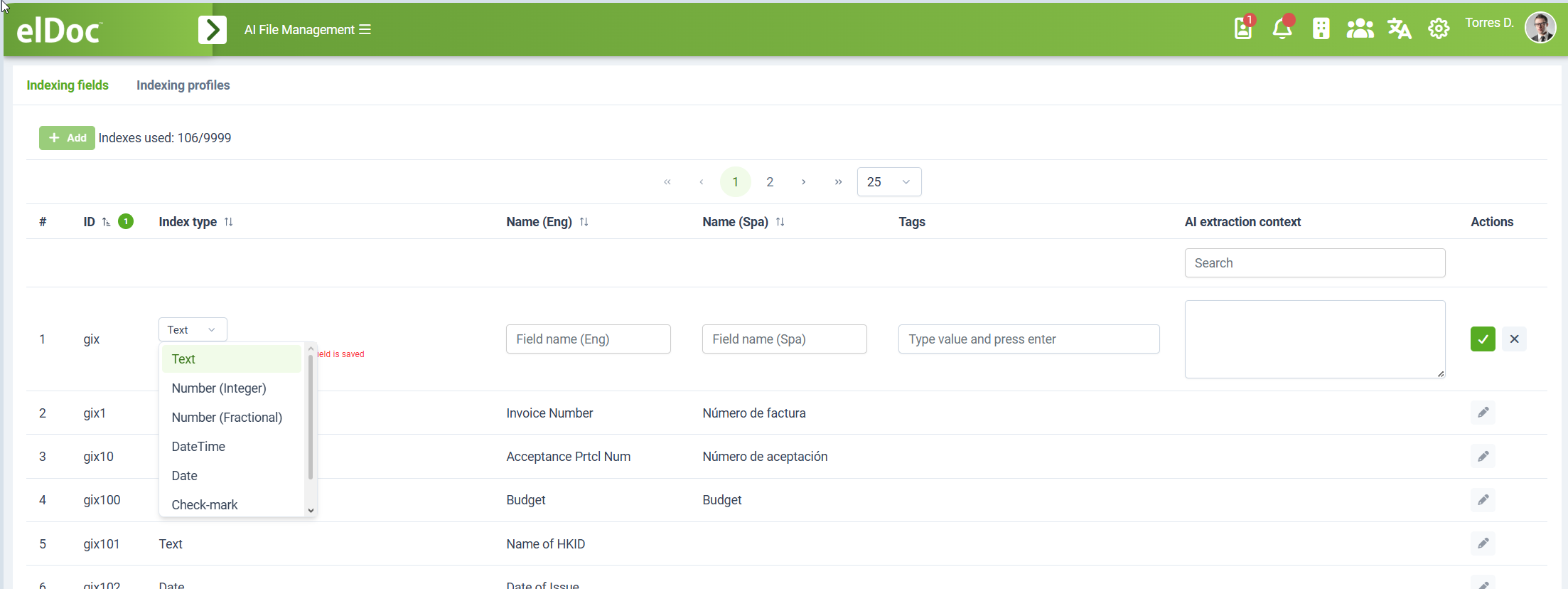
Creating an Indexing Field
To create an Indexing Field:
open Indexing settings;
select the Indexing fields tab;
click Add;
select the required Index type;
enter the field name for each enabled user-interface language;
optionally define Tags;
optionally provide AI extraction context;
save the field.
Each field receives its own unique identifier and becomes available for use in Indexing Profiles.
Index Field Types
Each Indexing Field has a defined data type.
Available field types include:
Text
Number (Integer)
Number (Fractional)
DateTime
Date
Check-mark
- Directory (List values)
The selected field type defines the kind of value that can be stored in the field.
For example:
| Indexing Field | Type |
|---|---|
| Bank | Text |
| Account Number | Text |
| Date | Date |
| Balance | Number (Fractional) |
| Number of Pages | Number (Integer) |
| Approved | Check-mark |
Selecting the appropriate type allows elDoc to maintain structured and consistent indexing values instead of treating all extracted information as unstructured text.
Multilingual Field Names
Indexing Fields support different names for each enabled elDoc user-interface language.
For example, the same Indexing Field can be defined as:
| Language | Name |
| English | Invoice Number |
| Spanish | Número de factura |
| Ukrainian | Номер інвойса |
| Simplified Chinese | 发票号码 |
| Traditional Chinese | 發票號碼 |
The underlying Indexing Field remains the same regardless of the language used to display it.
This allows organizations operating in multilingual environments to maintain a single indexing model while presenting field names in the user's selected interface language.
Only languages enabled in the corresponding elDoc installation are presented for configuration.
Tags
Indexing Fields can be assigned one or more Tags.
Tags provide additional semantic information about a field and can be used to categorize or identify fields independently from their displayed names.
For example, fields related to financial information can be tagged according to their business meaning or intended usage.
Tags are particularly useful when the same logical information may have different displayed names or when fields need to be selected or processed according to a common category.
Tags can also be used to identify and address Indexing Fields through the API.
AI Extraction Context
Each Indexing Field can include an AI extraction context.
The AI extraction context provides additional instructions and semantic information that help elDoc AI capabilities understand what the field represents and which value must be identified when processing a document.
For example, a field named:
Account Number
can be supplemented with extraction context explaining that the required value is the bank account identifier associated with the statement.
Similarly, a field named:
Balance
can contain context indicating which balance value must be extracted when a document contains several financial amounts.
This is particularly useful when:
the field name alone is insufficient to identify the required information;
several similar values exist in a document;
domain-specific terminology is used;
the extraction rule requires additional business context;
AI must distinguish between conceptually related values.
The AI extraction context therefore supplements the field name and data type with semantic guidance used by AI-based data extraction and retrieval.
Managing Indexing Fields
The Indexing Fields list displays the configured field definitions together with information such as:
ID;
Index type;
localized names;
Tags;
AI extraction context.
The list supports filtering and searching, making it easier to manage large sets of global Indexing Fields.
Existing fields can be edited using the corresponding action available in the Actions column.
Indexing Profiles
An Indexing Profile is a named collection of Indexing Fields.
Indexing Profiles group the fields required for a particular document type, business process, or repository.
For example, a profile named:
Bank Statement
can contain:
Bank
Account Number
Date
Balance
Currency
Transaction Type
A profile named:
Invoice
can contain:
Invoice Number
Invoice Date
Supplier
Customer
Currency
Total Amount
This allows the same global Indexing Fields to be reused in different combinations.
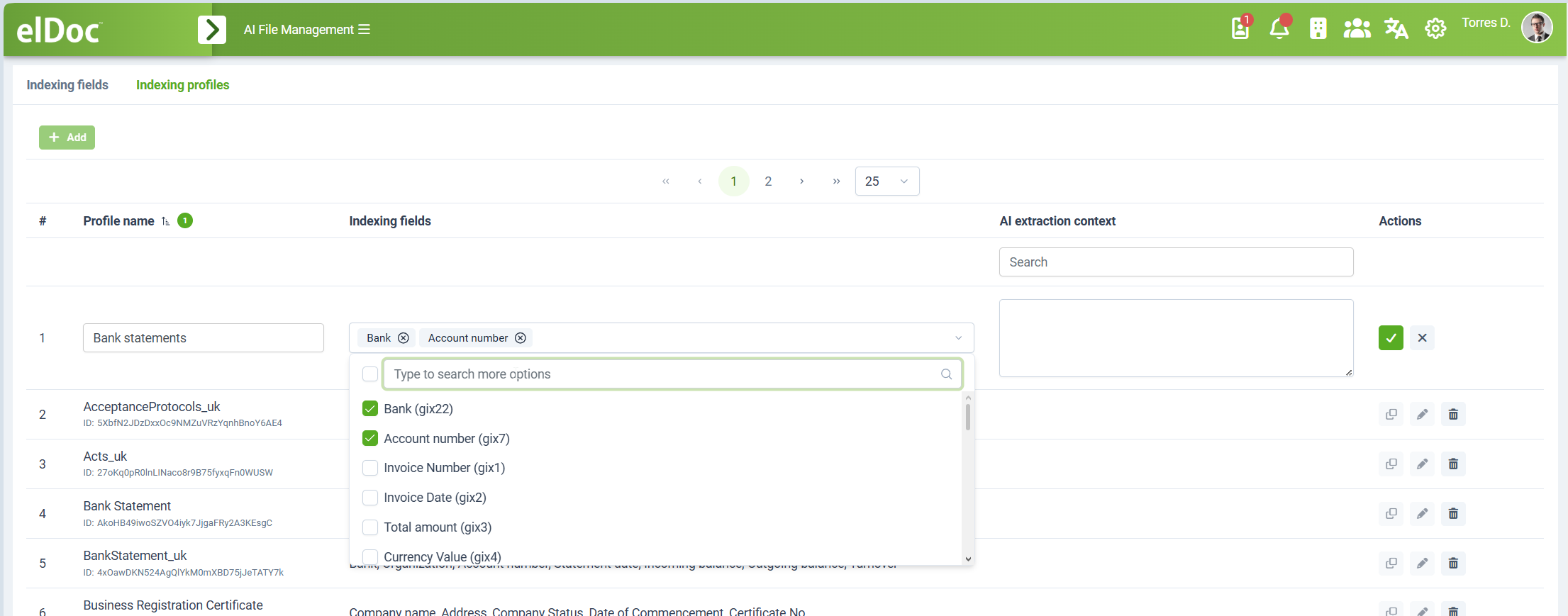
Creating an Indexing Profile
To create an Indexing Profile:
open Indexing settings;
select the Indexing profiles tab;
click Add;
enter the Profile name;
select the required Indexing fields;
optionally define AI extraction context for the profile;
save the profile.
The Indexing Fields selector allows multiple global Indexing Fields to be included in a single profile.
Existing profiles can be:
duplicated;
edited;
deleted.
Duplicating a profile is useful when a new document type requires a metadata structure similar to an existing profile.
Profile-Level AI Extraction Context
In addition to the AI extraction context configured for individual fields, an Indexing Profile can contain its own AI extraction context.
The profile-level context provides AI with additional information about the overall document type, extraction scenario, or interpretation applicable to the complete group of fields.
This provides AI processing with two levels of semantic information:
field-level context — explains the meaning of an individual value;
profile-level context — explains the overall document or extraction scenario.
For example, a Bank Statement profile can provide context describing the characteristics of a bank statement, while individual fields define how values such as account number, statement date, balance, and currency are interpreted.
This improves the accuracy and contextual understanding of AI-powered data extraction.
Assigning an Indexing Profile to a Folder
After an Indexing Profile has been created, it can be assigned to a folder in File Management.
To assign a profile:
select the required folder;
open the folder Details panel;
locate the Indexing Profile section;
select the required profile;
save the folder settings.
For example, the folder:
Bank Statement
can be assigned the Indexing Profile:
Bank Statement
containing the fields:
Bank
Account Number
Date
Balance
Currency
Transaction Type
The folder then has a predefined document indexing structure suitable for the documents stored in that location.
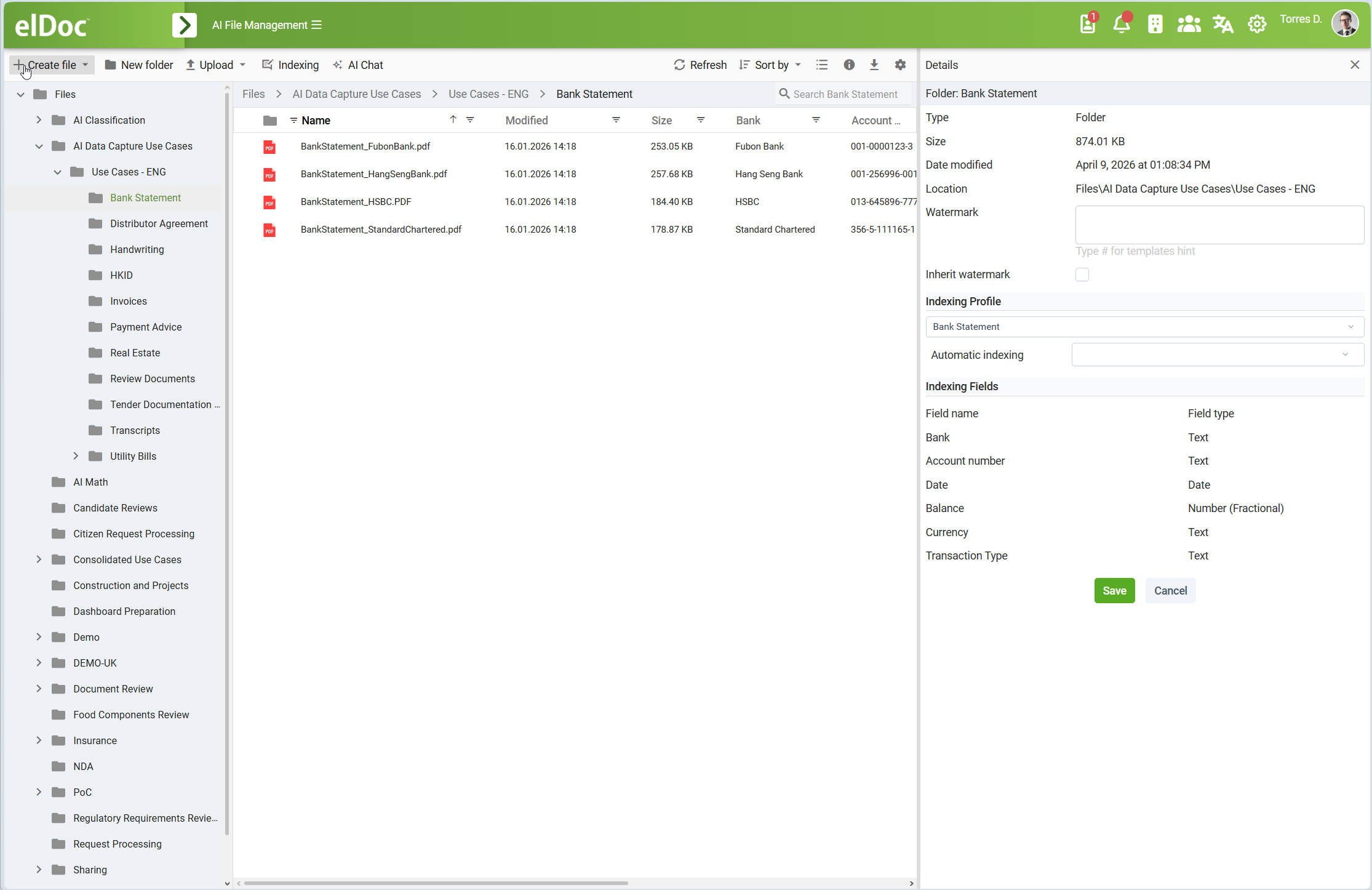
Folder-Based Indexing Model
Assigning an Indexing Profile to a folder allows document indexing requirements to follow the structure of the File Management repository.
For example:
AI Data Capture Use Cases
└── Use Cases - ENG
    ├── Bank Statement
    ├── Distributor Agreement
    ├── HKID
    ├── Invoices
    ├── Payment Advice
    └── Utility Bills
Different folders can be assigned different Indexing Profiles:
Bank Statement
    → Bank Statement profile

Invoices
    → Invoice profile

Utility Bills
    → Utility Bill profile

HKID
    → HKID profile
Each folder therefore provides the appropriate indexing fields for the type of documents stored in it.
This allows the File Management folder structure and document indexing configuration to work together.
Automatic Indexing
Folder settings also provide an Automatic indexing configuration.
This associates automatic indexing behavior with the folder and its assigned Indexing Profile.
When Automatic indexing is enabled, documents placed in the folder are processed using its assigned indexing configuration without requiring an Indexing Profile to be selected manually for each document.
Together with AI-based extraction, this supports automated processing scenarios in which documents are uploaded to the appropriate folder and the configured metadata fields are populated from their content.
AI-Powered Data Extraction
Indexing Profiles define the structured fields used by AI-powered data extraction in elDoc.
The process can be represented as:
Document
   ↓
Folder
   ↓
Indexing Profile
   ↓
Indexing Fields
   ↓
AI Extraction
   ↓
Structured Metadata
For example, when a bank statement is stored in a folder configured with the Bank Statement Indexing Profile, AI processing has access to the predefined fields:
Bank
Account Number
Date
Balance
Currency
Transaction Type
Together with their:
data types;
field names;
tags;
field-level AI extraction context;
profile-level AI extraction context.
The AI model uses this information to identify the relevant values in the document and populate the corresponding structured Indexing Fields.
Example: Bank Statement
Consider a folder configured as follows:
Folder: Bank Statement
Indexing Profile: Bank Statement
Indexing Fields:
| Field | Type |
| Bank | Text |
| Account Number | Text |
| Date | Date |
| Balance | Number (Fractional) |
| Currency | Text |
| Transaction Type | Text |
Documents stored in this folder use a consistent indexing structure regardless of the originating bank or document layout.
AI extraction can analyze the document content and associate detected information with the appropriate fields.
For example:
Bank: Fubon Bank
Account Number: 001-0000123-3
Date: 2026-01-16
Balance: 125430.25
Currency: HKD
The extracted values are stored in structured Indexing Fields instead of remaining only as unstructured information within the document content.
Reusing Indexing Fields
A major advantage of global Indexing Fields is reuse.
For example, the field:
Currency
can be used in:
Invoice profile;
Bank Statement profile;
Purchase Order profile;
Payment Advice profile;
Expense Report profile.
The field is defined only once but can participate in many different Indexing Profiles.
Likewise:
Company Name
can be used across contracts, certificates, invoices, registration documents, and other document types.
This provides a consistent enterprise-wide set of Indexing Fields and avoids duplicate or incompatible field definitions.
Indexing Architecture Overview
The relationship between indexing components can be summarized as:
Global Indexing Fields
        │
        │ selected into
        ▼
Indexing Profiles
        │
        │ assigned to
        ▼
File Management Folders
        │
        │ applied to
        ▼
Documents
        │
        │ manually or AI-populated
        ▼
Structured Indexing Data
A single Indexing Field can be reused by multiple Indexing Profiles, and each profile can be assigned where the corresponding metadata structure is required.
Indexing and AI
The indexing framework is an important part of elDoc's AI-powered document-management capabilities.
Traditional document indexing often relies on users or predefined integration rules to populate structured fields manually.
elDoc extends this model by combining structured Indexing Fields and Indexing Profiles with GenAI-based document understanding and data extraction.
The indexing definition tells AI processing:
what information is required;
what data type is expected;
what the field means;
what additional extraction context applies;
which group of fields belongs to the document-processing scenario.
This allows GenAI-based processing to convert unstructured document content into structured enterprise indexing data.
Indexing and Search
Structured indexing data complements the other information-retrieval mechanisms available in elDoc.
Document information can be accessed through:
folder navigation;
document indexing data;
indexing fields;
full-text search;
semantic retrieval;
GenAI Chat;
RAG and Agentic RAG.
Structured indexing data is particularly valuable when precise business values are required.
For example, semantic search can identify documents discussing a particular company, while an Indexing Field such as Company Name provides an explicitly identified structured value for the document.
These approaches complement each other: semantic and full-text retrieval provide flexible content discovery, while document indexing provides normalized structured values that can be searched, processed, and used by business logic and AI capabilities.
Recommended Configuration Approach
When configuring document indexing, use the following sequence:
identify the common metadata values used across the organization;
create reusable global Indexing Fields;
assign the correct data type to each field;
define names for all enabled UI languages;
add Tags where useful for categorization and processing;
provide AI extraction context for fields that require additional semantic guidance;
group related fields into named Indexing Profiles;
provide profile-level AI context where the overall document-processing scenario requires additional explanation;
assign the appropriate Indexing Profile to File Management folders;
configure automatic indexing where automated metadata extraction is required.
This approach creates a reusable and maintainable enterprise document indexing model instead of defining indexing fields independently for each repository or document type.
Summary
elDoc Document Indexing provides a configurable framework that combines structured document indexing with GenAI-powered document understanding and data extraction.
The framework supports:
globally reusable Indexing Fields;
multiple field data types;
multilingual field names;
field Tags;
field-level AI extraction context;
named Indexing Profiles;
profile-level AI extraction context;
assignment of profiles to File Management folders;
automatic indexing configuration;
AI-assisted extraction of structured metadata from document content.
By separating global Indexing Field definitions from reusable Indexing Profiles and folder assignments, elDoc enables organizations to build a consistent enterprise document indexing model while adapting it to different document types, repositories, languages, and AI-powered data-extraction scenarios.
Last modified: August 24, 2026